We have compiled a list of manufacturers, distributors, product information, reference prices, and rankings for Direct Printing.
ipros is IPROS GMS ・ IPROS One of the largest technical database sites in Japan that collects information on.

Direct Printing Product List and Ranking from 4 Manufacturers, Suppliers and Companies | IPROS GMS

Direct Printing Product List

1~5 item / All 5 items

Displayed results

Printing on curved, concave, and convex surfaces is possible! Versatile shape printing reverse transfer device.

Achieving thicker and thinner than the ink thickness considered to be the limit in screen printing!

We would like to introduce our "Diverse Shape Printing Reverse Transfer Device" that we handle. The transfer method of this product differs from conventional offset printing by applying the movement of a reverse coater, which is a type of conveyor or roll coater. With this method, ink is first screen printed onto a roll-shaped transfer film, and then the ink pattern on the transfer film can be accurately transferred onto curved surfaces. 【Features】 ■ Capable of printing on curved, concave, and convex surfaces ■ Utilizes the movement of the reverse coater ■ Allows for the transfer of ink while it is still wet *For more details, please refer to the PDF materials or feel free to contact us.

  • 1.PNG
  • 2.PNG
  • 3.PNG
  • 4.PNG
  • 5.PNG
  • Printing Machinery
  • Direct Printing

Added to bookmarks

Bookmarks list

Bookmark has been removed

Bookmarks list

You can't add any more bookmarks

By registering as a member, you can increase the number of bookmarks you can save and organize them with labels.

Free membership registration

LABO Material Identification Print Service

Writing and sticking labels by hand on containers for identification is a very labor-intensive task. Therefore, we printed the text and colors directly on the containers.

The printing is clear, so the text is sharp. Color identification is also possible. In addition to sequential numbers, barcodes and QR codes can be printed as well. Unlike labels, it is printed directly on the container, so there is no need for sticking.

  • Resin container
  • Direct Printing

Added to bookmarks

Bookmarks list

Bookmark has been removed

Bookmarks list

You can't add any more bookmarks

By registering as a member, you can increase the number of bookmarks you can save and organize them with labels.

Free membership registration

Print drawing data and image data directly with just this! VoiCePRINT

With just this, you can print drawing data and image data directly! You can select files or folders, or simply drag and drop them for batch printing.

VoiCePRINT is a tool for directly printing drawing data and image data. No application is required to open the data, and bulk printing can be done with simple operations. Additionally, if you have a document output driver such as a PDF driver, you can smoothly document CAD data and image data. Furthermore, in the server version, you can control processing and settings from the command line, making it possible to integrate with server applications and others. CAD data: DXF/DWG/Jw_cad (jwc, jww, jwk)/SXF (sfc, p21) Image data: Bitmap/JPEG/TIFF *Note: A separate conversion tool is required for DWG. Please visit our company website for more details.

  • Other CAD related software
  • Other information systems
  • EAI/ETL/WEB application server
  • Direct Printing

Added to bookmarks

Bookmarks list

Bookmark has been removed

Bookmarks list

You can't add any more bookmarks

By registering as a member, you can increase the number of bookmarks you can save and organize them with labels.

Free membership registration

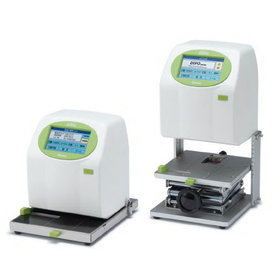
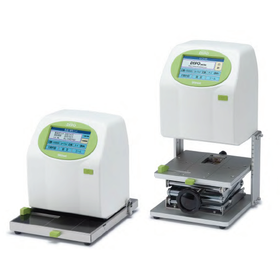
For cable identification! Direct printing with a fast-drying inkjet printer.

With the original gauge, printing on various materials is easy and speedy! Installation and maintenance are also simple, allowing for long-term use.

Have you ever experienced confusion about what a cable is by asking, "What kind of code is this cable?" Many power cords and cables look similar, making it difficult to identify the necessary cable. HALLO DiPO and the original gauge are helpful for identifying such cables! By directly printing the part number and usage on the cable itself, you can easily confirm "what kind of cable it is" at a glance. The original gauge securely holds the cable with a clip. Since the printable area is framed, you can visually check the position before printing, allowing anyone to print easily and neatly in the same spot. A key feature is its compatibility with cables of varying thicknesses. Additionally, DiPO allows you to choose from fast-drying ink and UV-curable ink, as well as black and white inks according to your needs. You can achieve clear and visible prints that match the material and color. This is recommended for those who find it difficult to manage with handwritten labels or stickers and want to print directly on the cables. It's also possible to create original gauges tailored to the material and shape. Why not solve your printing "troubles" with DiPO? For more details, please see the article below.

  • Commercial printers
  • Printer
  • Inkjet printer
  • Direct Printing

Added to bookmarks

Bookmarks list

Bookmark has been removed

Bookmarks list

You can't add any more bookmarks

By registering as a member, you can increase the number of bookmarks you can save and organize them with labels.

Free membership registration

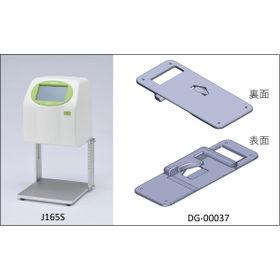
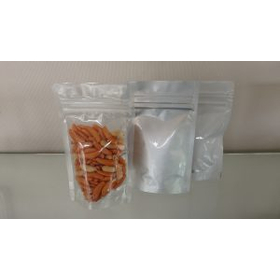
Easy stand pack printing! Direct printing on the side gussets with inkjet.

The side of the stand pack is difficult to print on... We solve that problem! By using a dedicated gauge, you can easily and beautifully print directly on the curved sides.

- Do you have trouble aligning the print on the side gusset of stand-up pouches? Stand-up pouches are widely used for snacks, side dishes, cosmetics, and more, but the curved gusset area is difficult to print on with a standard inkjet printer. - The solution to this printing challenge is an inkjet printer combined with a dedicated original gauge! - By using the dedicated gauge "DG-00037," you can set the stand-up pouch in the designated position, allowing for accurate printing on the curved gusset area. It also accommodates printing in areas like the bottom right back for expiration dates and lot numbers. This is convenient for products that require printing in small quantities. Even in cases where "printing is not possible with a standard printer" or "we are using stamps or handwriting," creating a custom gauge tailored to the material and shape can expand your printing possibilities. For more details, please see the article below.

  • J165SDG00037-300x184.png
  • P8051977-300x169.jpg
  • Inkjet printer
  • Commercial printers
  • Direct Printing

Added to bookmarks

Bookmarks list

Bookmark has been removed

Bookmarks list

You can't add any more bookmarks

By registering as a member, you can increase the number of bookmarks you can save and organize them with labels.

Free membership registration